
A successful SAP Business One migration is a controlled business change, not a database copy. Partners reduce risk by standardising discovery, designing the target environment, rehearsing the move, defining rollback, validating every dependency and communicating clearly. A repeatable process turns one-off technical projects into a scalable service with predictable effort and outcomes.
Many difficult migrations fail long before cutover. The root cause is usually incomplete discovery, unclear ownership or a plan that assumes the SAP database is the whole service. In reality, a customer environment may depend on add-ons, integrations, scheduled tasks, file shares, email relays, print services, remote access, reporting tools, interfaces and local network rules. Each dependency must either move, be replaced or remain connected after the migration.
For SAP Business One partners, the objective is to preserve business continuity, maintain data integrity and give users confidence from the first working day. That requires a method that can be repeated across a portfolio, rather than reinvented for every customer.
Why do SAP Business One migrations become difficult?
Migration complexity usually comes from variation. Two customers with the same SAP Business One version may have completely different databases, add-ons, interfaces, security requirements, user locations and tolerance for downtime. Problems arise when those differences are discovered during cutover instead of during assessment.
Undocumented add-ons, integrations or scheduled processes.
Old operating systems, database versions or unsupported components that cannot be reproduced safely.
Insufficient bandwidth or unrealistic assumptions about database-transfer time.
No agreed system-of-record freeze, leaving transactions to be reconciled manually.
User authentication, printers, email or file paths that change without testing.
An incomplete rollback plan or no clear authority to invoke it.
Customer communications that focus on technical tasks rather than operational impact.
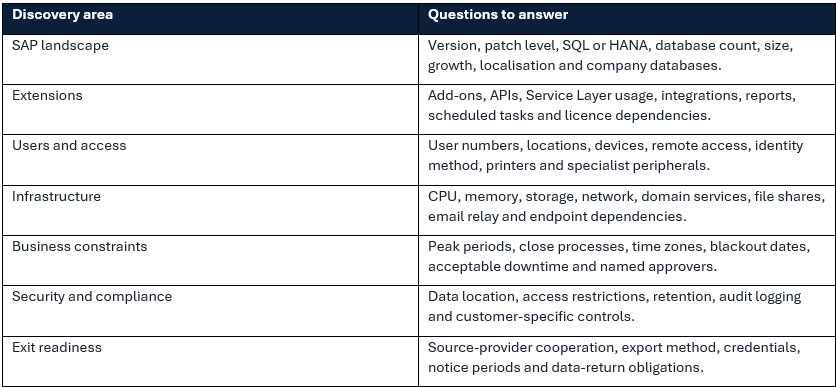
What should discovery cover before any migration is scheduled?
Discovery should create a complete, signed-off view of the source environment and the required target service. It is both a technical assessment and a commercial control: assumptions that are not documented often become unplanned work, delayed delivery or margin loss.
How should the target environment be designed?
The target should be based on measured workload and expected growth, not simply a copy of the old server specification. Legacy environments may be oversized because capacity was purchased in large steps, or undersized because hardware has not kept pace with database growth. The design should account for database platform, concurrent users, add-ons, integrations, reporting demand, storage performance and resilience requirements.
The partner and provider should also agree the operating model: who manages the operating system, database, backups, monitoring, security alerts, capacity and incident escalation? A technically sound design can still fail commercially if responsibilities are ambiguous after go-live.
What does a reliable SAP Business One migration plan contain?
1. Confirm scope, assumptions, owners and acceptance criteria.
2. Build and secure the target environment before moving production data.
3. Install compatible SAP Business One components, add-ons and dependencies.
4. Complete a test data transfer using the intended migration method.
5. Measure transfer, restore, and validation timings rather than estimating them.
6. Run functional, integration, performance and user-access tests.
7. Agree the production freeze, communication timetable and decision checkpoints.
8. Prepare a detailed cutover runbook and an equally detailed rollback runbook.
9. Execute the production move with timestamped task tracking.
10. Validate, obtain business sign-off and provide enhanced post-go-live support.
Why is a test migration essential?
A test migration converts assumptions into evidence. It verifies that the data can be extracted, transferred and restored; reveals missing dependencies; establishes realistic timings; and gives users a chance to validate critical processes before the production window.
The test should use a recent copy of production data and the same method planned for cutover. A superficial technical check is not enough. The partner should test login, core transactions, reports, print output, email, integrations, add-ons, scheduled jobs, authorisations and performance. Where possible, nominated customer users should complete a structured acceptance script and record results.
How can downtime be reduced without increasing risk?
Downtime is reduced through preparation, not by rushing the production move. Pre-building infrastructure, pre-installing components, testing connectivity and rehearsing the runbook remove tasks from the outage window. The final database transfer should be measured during rehearsal so the cutover period is based on evidence.
Schedule around business cycles, month-end, warehouse shifts and international time zones.
Freeze avoidable technical changes before migration.
Use clear entry criteria so cutover does not begin with unresolved test failures.
Prepare users, credentials, connection details and support contacts in advance.
Keep communication concise: what is unavailable, when service should return, and where issues should be reported.
Do not compress validation to meet an arbitrary deadline; a controlled rollback is better than an unstable go-live.
What should a rollback plan include?
Rollback is not a statement that the old server still exists. It is a timed, approved process that returns the customer to a known operating state. The plan should define the latest safe decision point, who can authorise rollback, how users will be notified, which data changes may need reconciliation and how the next migration attempt will be prepared.
The team must also protect data consistency. If users are allowed into the new system before final acceptance, rolling back can create transactions in two environments. That is why cutover control, system access and decision timing must be explicit.
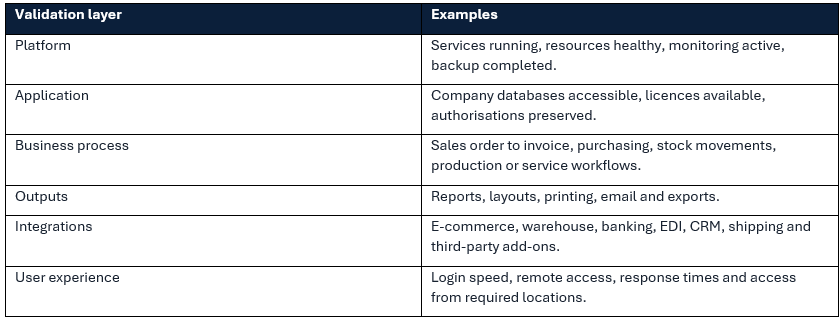
How should validation be structured?
Validation should confirm technical health and business usability. Technical checks include services, databases, backups, monitoring, storage, security agents and integration endpoints. Business checks should cover the customer’s most important end-to-end processes, not only whether SAP Business One opens.
 How should customers be communicated with?
Good communication reduces operational risk because people know what to expect and how to respond. The customer needs a business-facing plan that states scope, timing, user impact, responsibilities, testing requirements, support arrangements and the criteria for success. Technical detail can sit in a separate runbook.
Communication should begin during planning, not on the evening of cutover. Identify a customer sponsor, technical contact and business validators. Confirm who will approve downtime, who signs off testing and who can make the go/no-go decision. After go-live, provide a clear channel for issues and distinguish migration defects from unrelated existing problems.
What is the Migration Factory approach?
Migration Factory is a standardised delivery model for moving multiple customer environments through a consistent sequence of assessment, design, build, test, cutover and validation. It replaces bespoke project chaos with reusable templates, defined quality gates, predictable roles and accumulated learning.
Cloud4Partners’ Migration Factory is positioned as a structured, repeatable and low-risk route for SAP Business One partners moving on-premise customers to its AWS-based platform. The strategic advantage is scale: partners can modernise a customer base without every migration consuming the same senior consultants and management attention as the first.
How does standardisation improve quality and margin?
Standardisation does not mean ignoring customer differences. It means handling differences through controlled pathways. A partner can define migration classes based on database platform, size, add-on complexity, integration count and downtime tolerance. Each class then has standard inputs, tasks, acceptance evidence and pricing assumptions.
This improves forecasting and exposes exceptions early. It also creates data: actual transfer times, common defects, effort by stage and causes of delay. That information can refine pricing, sales qualification and technical design, turning migration from an unpredictable project into a repeatable growth capability.
A go-live readiness checklist
Discovery and scope signed off.
Target architecture approved and operational responsibilities documented.
All required SAP components, add-ons and integrations installed.
Test migration completed with timings recorded.
Critical business processes passed by nominated customer users.
Backup and recovery controls active on the target platform.
Cutover and rollback runbooks approved.
Customer communications issued and support contacts confirmed.
Go/no-go authority named and available.
Post-go-live monitoring and hypercare schedule agreed.
Further Reading:
How to Choose the Right SAP Business One Hosting Provider
Why More SAP Business One Partners are Moving Customers to the Cloud
Why SAP Business One Partners are Outsourcing Infrastructure Management
Frequently asked questions
How long does an SAP Business One migration take?
The overall project may take several weeks, while production downtime is usually a much shorter window. Duration depends on discovery quality, database size, add-ons, integrations, testing and the cooperation of the source provider.
Can SAP Business One be migrated without upgrading it?
Sometimes, but compatibility must be assessed across the operating system, database, SAP version, add-ons and target architecture. Combining migration and upgrade can create unnecessary risk, while separating them may be inefficient; the correct sequence depends on the estate.
What is the biggest risk in an SAP Business One cloud migration?
The biggest risk is an undocumented dependency that prevents a critical process from working after cutover. Thorough discovery and a realistic test migration are the strongest controls.
Who should sign off the migration?
Technical staff should confirm platform and application health, but a nominated customer business owner should approve critical process validation. A migration is not complete merely because the infrastructure team can log in.
Can multiple customers be migrated through the same process?
Yes. Migration Factory uses a standard lifecycle and quality gates while allowing controlled variations for database platform, size, add-ons and integrations. This is the basis for scaling migrations across a partner’s installed base.
Turn migration demand into a repeatable partner service
Customer demand for cloud should not force a partner into a queue of bespoke, high-risk projects. A disciplined migration method protects users, data and margin while building a capability that improves with every move. To assess your installed base or plan a repeatable migration programme, explore the Cloud4Partners Migration Factory.